

The WP Server Dashboard just took its biggest step yet. Earlier this year we rolled out control over your server — reboot, snapshots, bandwidth, DNS and firewall. Today, we’re extending that control down to the website level too, with a brand new Site Manager and a new Events log.
What’s New at a Glance
- Refreshed Server Dashboard — more server-level controls, with a cleaner, more compact look
- Site Manager — view and manage every website on your server, right from your dashboard
- One-click service restarts — Nginx, PHP, MySQL and Redis, individually, without a full server reboot
- Page & Object Cache clearing — purge either cache independently, per site, whenever you need to
- Additional domain management — attach extra domains to any site yourself
- PHP runtime switcher — change the PHP version a site runs on in a couple of clicks
- Events — a running history of what’s happened on your server, and when
- Snapshots — on-demand, whole-server point-in-time backups
- Bandwidth Usage — a full daily transfer graph and monthly allowance tracking
- Firewall Manager — self-service network firewall rules, including one-click Cloudflare-only protection
- DNS Manager — free, high-performance Anycast DNS, managed entirely from your client area
Server Dashboard
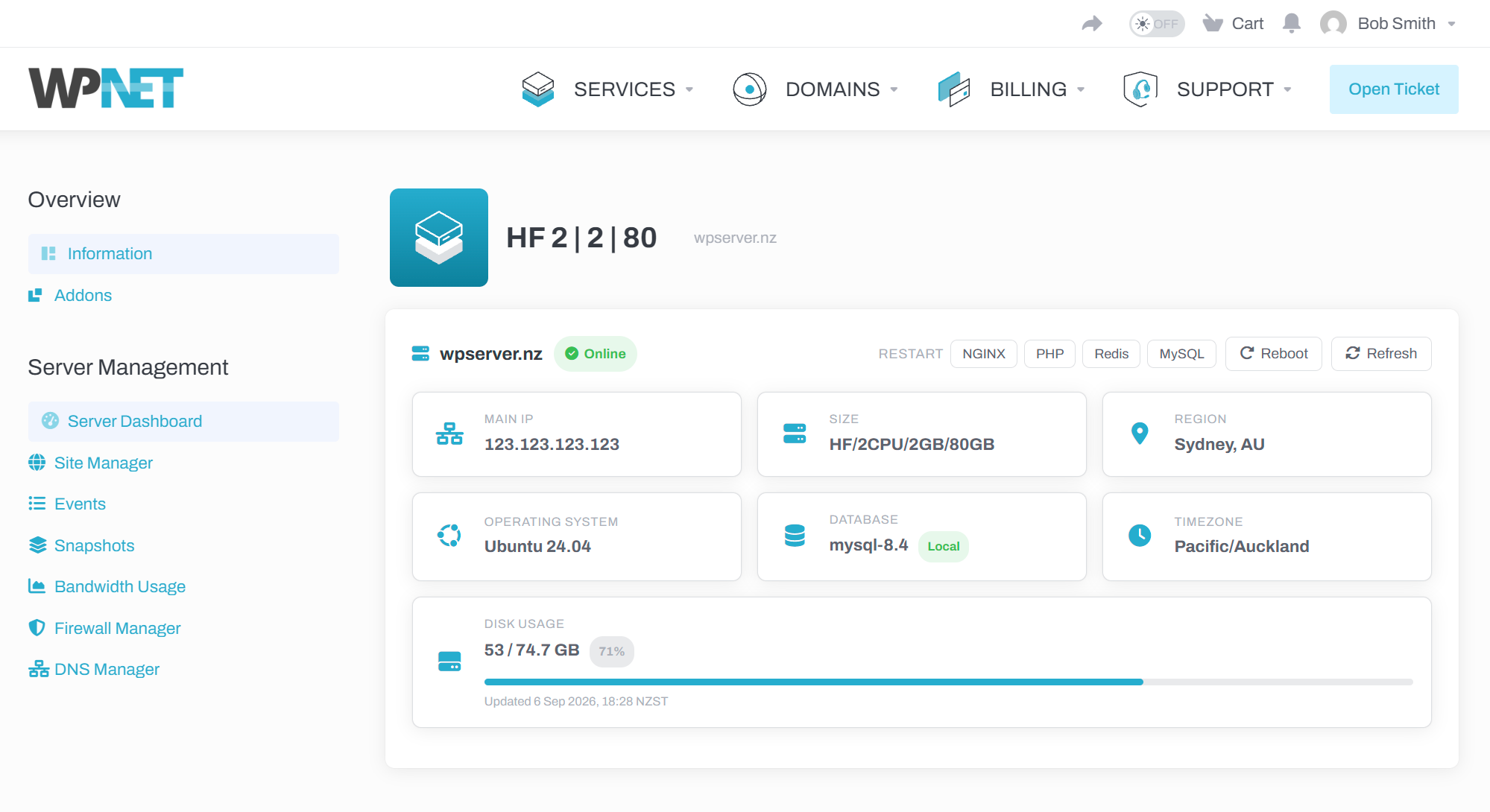
- Reboot your server instantly, with a live status indicator so you can see the moment it’s back online
- See your server’s main IP, size, region, operating system, database and timezone at a glance
- Keep an eye on disk usage, with a running total and percentage used
One-Click Service Restarts
You can now restart Nginx, PHP, Redis and MySQL individually, right from the dashboard — with no downtime for the rest of your services and no CLI access required.
Introducing Site Manager
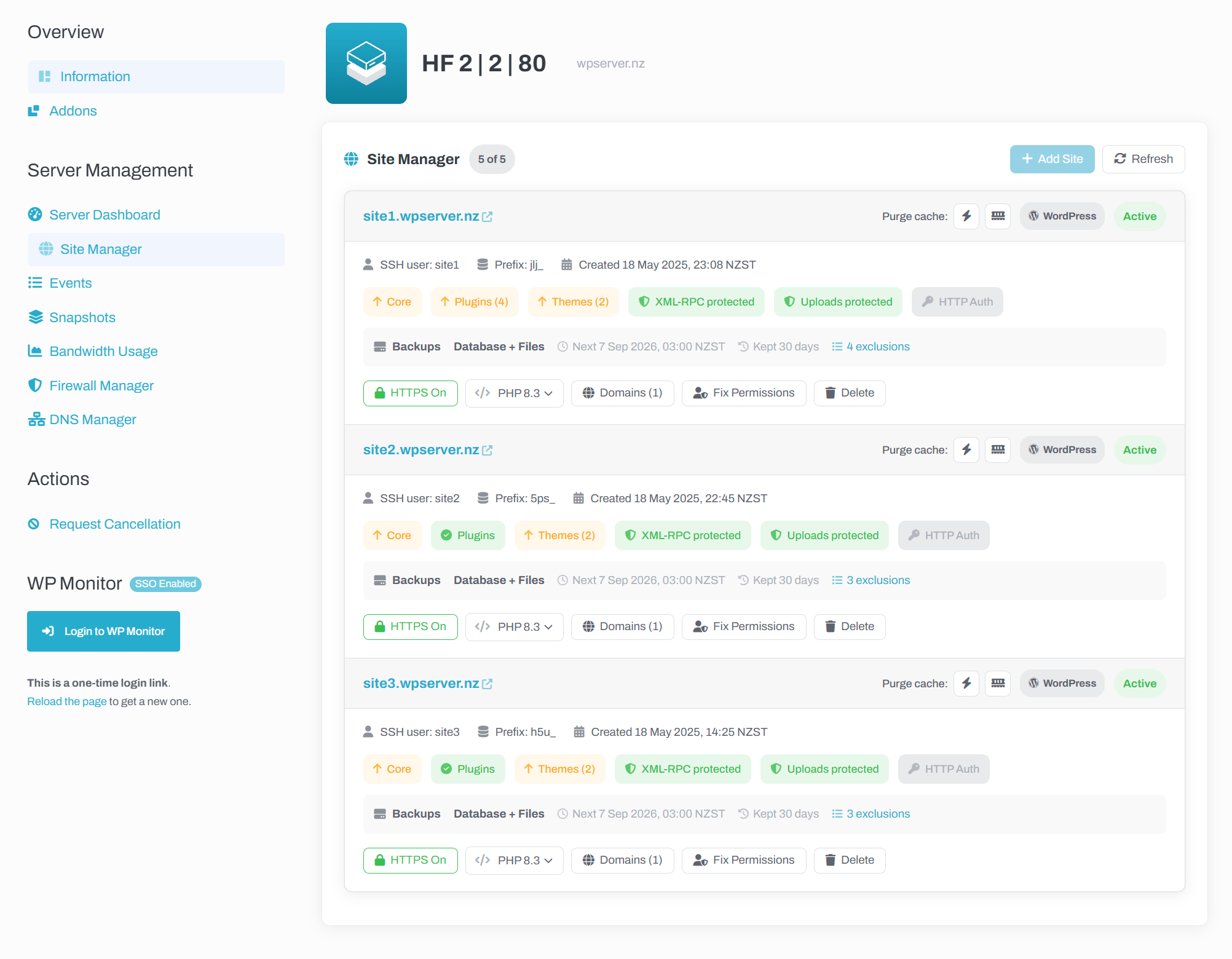
- WordPress sites show at-a-glance indicators for available core, plugin and theme updates
- Add a new site in a couple of clicks, straight from your dashboard
- View site backup status, including next backup time and path exclusions
- Toggle HTTPS on or off for any site
Page & Object Cache Clearing
You can now clear your Page Cache and Object Cache independently, per site, with one click each — whenever you need it.
Additional Domain Management
Attach extra domains to any existing site yourself — a secondary domain, or simply pointing a new domain at an existing site — no more waiting on a support ticket.
PHP Runtime Switcher
Change the PHP version a site runs on in a couple of clicks. Useful for testing compatibility ahead of a PHP upgrade, or rolling a site back to an earlier version if something doesn’t play nicely with the latest release.
Why this matters: the day-to-day jobs that used to mean waiting on a support ticket — adding a site, restarting a service, clearing a stubborn cache, attaching a domain, bumping a PHP version — are now instant and self-service, whenever you need them.
Events
Alongside Site Manager, we’re also introducing an Events log — a running history of actions taken on your server, so you can see exactly what’s happened and when.
Snapshots
Every WP Server includes on-demand Snapshots — a complete, point-in-time image of your entire server: every website, every database, every file and every setting, captured together.
A Snapshot is not a per-site backup, and it doesn’t roll back individually. Restoring one rolls the whole server back to that exact moment — anything that’s changed since is lost. Treat it as a last-resort, whole-server rollback tool, ideal as a safety net immediately before a risky change such as a big migration — not as a routine backup solution.
We’ve also polished the Snapshots page itself: while a snapshot is being created, the page now updates itself automatically, so there’s no need to keep hitting refresh to check on progress.
Server snapshots are retained for 12 hours and then permanently deleted.
Bandwidth Usage
Track your server’s data transfer with a full daily graph for the current month, plus a running total against your plan’s allowance.
Firewall Manager
Firewall Manager gives you direct control over the network-level firewall protecting your WP Server. This is separate from your server’s own local firewall — it filters traffic before it ever reaches your server, and WP NET continues to manage the local server firewall automatically.
Default-Deny, Allow-Only Rules
Your firewall is default-deny: unless a rule explicitly allows it, traffic simply can’t reach your server. If you don’t use SFTP or SSH directly, our recommendation is — leave port 22 closed by not adding a rule for it at all.
One-Click Cloudflare-Only Protection
If your domain runs through Cloudflare’s proxy, a dedicated option restricts a rule to Cloudflare IP addresses only — and the underlying IP list is kept current automatically.
Quick-Add Rule Presets
Pick a preset — like Web (ports 80/443) or SSH — and click Apply to add a ready-made, correctly configured rule in a couple of clicks.
DNS Manager
DNS Manager is a free, high-quality Anycast DNS service for every WP Server customer, built on Vultr’s global Anycast DNS network — served from multiple points of presence around the world simultaneously, so lookups for your domains are answered from whichever location is closest and fastest for each visitor.
- Add a domain, then manage individual A, AAAA, CNAME, MX, TXT, NS and CAA records
- Export a zone at any time as a .zone, .csv or .json file — handy for backups or migrating elsewhere, with no lock-in
Getting a domain pointed at WP Server DNS: add the domain in the DNS Manager, then update its nameservers at your domain registrar to ns1.vultr.com and ns2.vultr.com. As with any DNS change, allow some time for it to propagate globally.
More to Come
Site Manager and Events mark the next chapter in an ongoing project: putting more of the controls that power your WP Server directly in your hands. We’re continuing to build out the dashboard with more self-service tools — watch this space!
As always, if you have any questions about any of the above, get in touch — or open a support ticket if you’d like a hand getting DNS or firewall rules set up on any existing service.